Thread ripper is a tool coded in C# and as it's name suggest it's a link ripping tool from threads(web forums)It is designed for special case scenarios like you had a 1000 page pictures thread in any web forum and you accidentally deleted all those images from your HDD,and want to recollect them all.Then thread ripper can be a good solution for you.
how it works......
STEP 1.
first find the target thread you want to grab pics/links from.
suppose it's http://www.whitegadget.com/pc-wallpapers/3853-katrina-kaif-wallpaper.html
now this thread has 45 pages.
STEP 2.
Analyze the link structure
 if don't already know,this window opens by right clicking on any image and selecting view image info in Firefox,you can directly see page source if this option is unavailable to you for some reason.As you can see all images in this thread starts with http://www.whitegadget.com/attachments/ so it will be much easier to find now.
STEP 3.
Setting thread ripper
We already know that we are using this
http://www.whitegadget.com/pc-wallpapers/3853-katrina-kaif-wallpaper.html
thread as target.So lets see how pages are managed in this thread,try to copy the link for page 2
http://www.whitegadget.com/pc-wallpapers/3853-katrina-kaif-wallpaper-2.html
similarly
http://www.whitegadget.com/pc-wallpapers/3853-katrina-kaif-wallpaper-3.html
so now we know how pages are managed in this thread or we can say this web-forum.

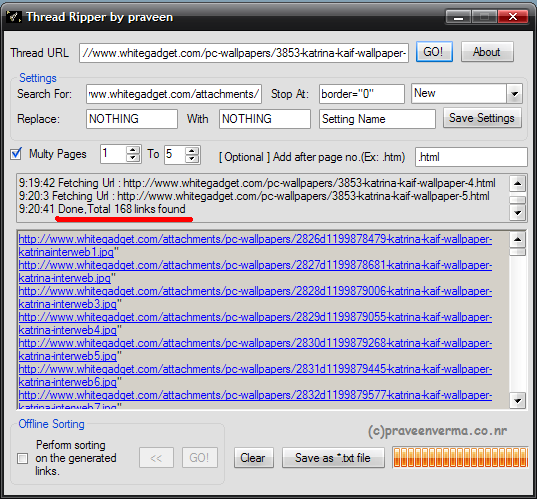
1. Target URL : http://www.whitegadget.com/pc-wallpapers/3853-katrina-kaif-wallpaper-
(Note: we are going to use multi page option here and the page no. will be added after the url so we are not using .html at the end of the target URL,if you are going to use a single page then you have to paste the complete URL.)
2. Search for : http://www.whitegadget.com/attachments/
3. Stop at : border="0"
Why? because when you open page source and analyze the link it will look like this.........
and we just need http://www.whitegadget.com/attachments/............................jpg part of all images,that's why.
4. Enable multy page option,now you can enter range of page no. you want to grab the links.
5. we are going to start from page 1
6. to page 5
7. Have to add .html at the end of the link.
8. lets run this puppy.

9. 168 links found! You can save this links in a text file and import it to IDM or any other download manager.
There are some other options which i didn't mention yet,lets talk about that.
- Replace : With
This feature is useful when downloading images from thumbnails etc.For example some host like http://picscrazy.com didn't allow direct linking of images instead they provide thumbnails of images.
so the link in the forum looks like this...
http://picscrazy.com/thumb/abcd.jpg
but the link for original image will be...
http://picscrazy.com/image/abcd.jpg
So in such case you can replace thumb with image.
-offline sorting
This feature allows you to edit the resultant links in offline mode,keep reading for more detail on this option
Target URL : http://forums.superiorpics.com/ubbthreads/ubbthreads.php/topics/3481355#Post3481355
In this thread images are from different sources(different servers) so we have to grab all the image links in it and filter the links we want.

If you can see,there are many different image links including forum avatars,signatures,adds and some html parts,lets clean this mess.The links we are interested in,starts with http://img and ends with ".
Enable the offline sorting,two buttons will be enabled inside it.First one << is a back button if any thing goes wrong you can go back to previous result.The second one performs the sorting,just enter what to search,where to stop and replace:with (optional) and press this button.like this......
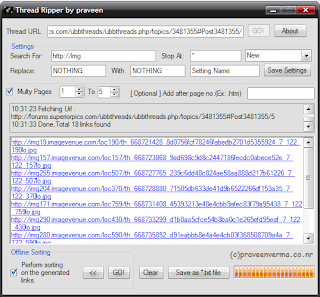 After sorting we have left only with plain image links that we were interested.
-Save Settings
Simple and sweet save settings button saves all the information in the Search for,Stop At,Replace,With text boxes in the settings.ini file,so you can use them later to search links from the same thread or web-forum.
That's all folks. :)
Download Thread Ripper-
http://praveenverma.co.nr/support/Thread_ripper.rar
how it works......
STEP 1.
first find the target thread you want to grab pics/links from.
suppose it's http://www.whitegadget.com/pc-wallpapers/3853-katrina-kaif-wallpaper.html
now this thread has 45 pages.
STEP 2.
Analyze the link structure

STEP 3.
Setting thread ripper
We already know that we are using this
http://www.whitegadget.com/pc-wallpapers/3853-katrina-kaif-wallpaper.html
thread as target.So lets see how pages are managed in this thread,try to copy the link for page 2
http://www.whitegadget.com/pc-wallpapers/3853-katrina-kaif-wallpaper-2.html
similarly
http://www.whitegadget.com/pc-wallpapers/3853-katrina-kaif-wallpaper-3.html
so now we know how pages are managed in this thread or we can say this web-forum.

1. Target URL : http://www.whitegadget.com/pc-wallpapers/3853-katrina-kaif-wallpaper-
(Note: we are going to use multi page option here and the page no. will be added after the url so we are not using .html at the end of the target URL,if you are going to use a single page then you have to paste the complete URL.)
2. Search for : http://www.whitegadget.com/attachments/
3. Stop at : border="0"
Why? because when you open page source and analyze the link it will look like this.........
< img src="http://www.whitegadget.com/attachments/pc-wallpapers/2826d1199878479-katrina-kaif-wallpaper-katrinainterweb1.jpg" border="0" alt="Name: Katrinainterweb1.jpg Views: 28465 Size: 79.9 KB" />
and we just need http://www.whitegadget.com/attachments/............................jpg part of all images,that's why.
4. Enable multy page option,now you can enter range of page no. you want to grab the links.
5. we are going to start from page 1
6. to page 5
7. Have to add .html at the end of the link.
8. lets run this puppy.
9. 168 links found! You can save this links in a text file and import it to IDM or any other download manager.
There are some other options which i didn't mention yet,lets talk about that.
- Replace : With
This feature is useful when downloading images from thumbnails etc.For example some host like http://picscrazy.com didn't allow direct linking of images instead they provide thumbnails of images.
so the link in the forum looks like this...
http://picscrazy.com/thumb/abcd.jpg
but the link for original image will be...
http://picscrazy.com/image/abcd.jpg
So in such case you can replace thumb with image.
-offline sorting
This feature allows you to edit the resultant links in offline mode,keep reading for more detail on this option
Target URL : http://forums.superiorpics.com/ubbthreads/ubbthreads.php/topics/3481355#Post3481355
In this thread images are from different sources(different servers) so we have to grab all the image links in it and filter the links we want.
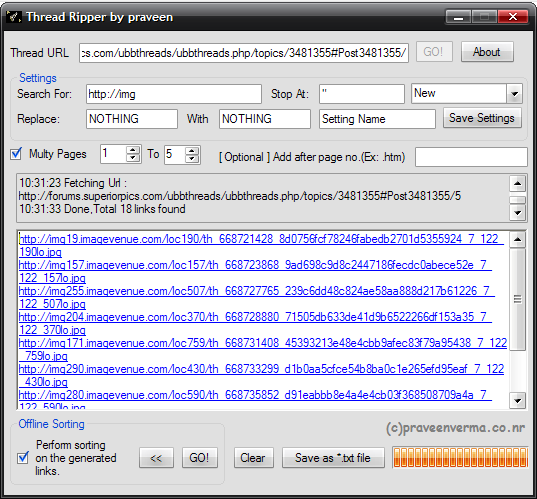
If you can see,there are many different image links including forum avatars,signatures,adds and some html parts,lets clean this mess.The links we are interested in,starts with http://img and ends with ".
Enable the offline sorting,two buttons will be enabled inside it.First one << is a back button if any thing goes wrong you can go back to previous result.The second one performs the sorting,just enter what to search,where to stop and replace:with (optional) and press this button.like this......
-Save Settings
Simple and sweet save settings button saves all the information in the Search for,Stop At,Replace,With text boxes in the settings.ini file,so you can use them later to search links from the same thread or web-forum.
That's all folks. :)
Download Thread Ripper-
http://praveenverma.co.nr/support/Thread_ripper.rar


